You plug in a new air purifier. You hit the power button. The fan starts humming.
But is it actually doing anything?
That’s the million-dollar question. Air purifiers aren’t like toasters. You can’t see a piece of bread turn golden brown.
The work they do is invisible. And that makes it tough to know if you’re getting what you paid for.
I’ve tested dozens of air purifiers over the years. I’ve learned exactly what to look for. Trust me, there are real, measurable ways to know if your unit is pulling its weight.
Let’s cut through the noise.
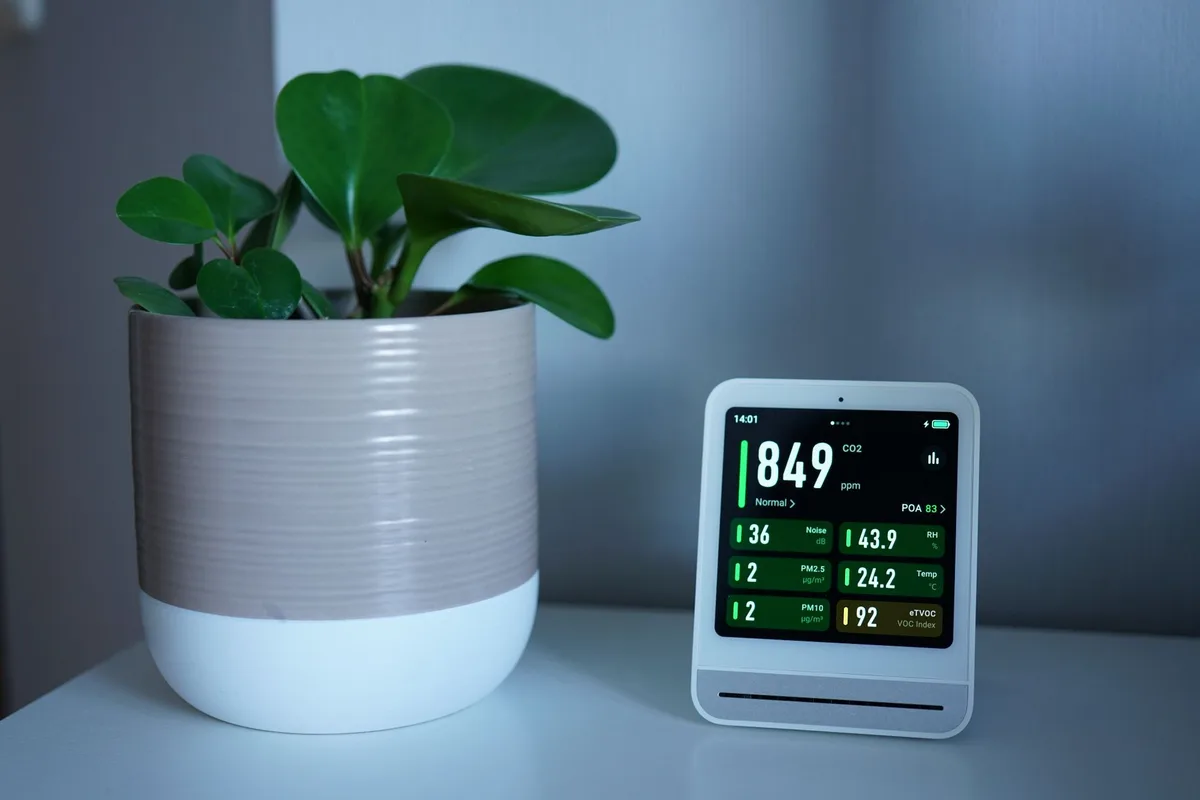
Image source: Pexels / Tim Witzdam (Pexels License)
Check the Air Quality Monitor (If Yours Has One)
Many modern air purifiers come with a built-in sensor. It measures particulate matter in real time. This is your first and most obvious clue.
Walk over to the unit. Look at the display. Most models show a color-coded reading:
- Blue or green means good air quality
- Yellow or orange means moderate pollution
- Red means poor air quality
Here’s the test: do something that creates particles. Cook bacon. Light a candle.
Spray some deodorant. Watch what happens.
If the purifier is working, that display should change color within seconds. The number on the screen (usually PM2.5 or PM10) should spike. Then, over the next few minutes, it should drop back down as the unit cleans the air.
That’s proof of action. That’s your machine saying “I see the problem, and I’m fixing it.”
What If You Don’t Have a Monitor?
Not every purifier has an onboard sensor. Some simply blow air through a filter and trust the process. That’s fine.
But you need other ways to verify performance.
Don’t worry, we’ve got plenty.
Use Your Own Senses
Your body is surprisingly good at detecting air quality changes. You just have to pay attention.
Smell Test
Stale odors tell you something. After running your purifier for a few hours, walk into the room from outside. Take a deep breath.
Does the air feel fresher? Can you smell less cooking odor, pet smell, or mustiness?
I do this test every time I review a new unit. The difference is often obvious. A working purifier with a good carbon filter will noticeably reduce odors within 30 to 60 minutes.
Dust Accumulation
Here’s a slower but very reliable method. Pick a flat surface in the room, a bookshelf, a desk, a window sill. Wipe it clean.
Then check it every few days.
A working air purifier captures dust before it settles. You should see noticeably less dust building up on surfaces compared to before you had the unit running.
I’ve seen people go from dusting every three days to once every two weeks. That’s not placebo. That’s the filter doing its job.
Breathing Comfort
Do you wake up with less congestion? Do you sneeze less during the day? Do your eyes feel less irritated?
These are subjective signs, but they’re real. If you have allergies or asthma, a working purifier should make a difference you can feel. Just give it a few days of continuous operation.
Check the Filter
This is the most concrete evidence you’ll ever get. Open the front panel. Pull out the filter.
Look at it.
A brand new HEPA filter is bright white. After weeks or months of use, it should look dirty. Gray.
Dusty. Maybe even dark brown near the intake side.
That trapped grime is proof. Every particle stuck in those fibers is one less particle floating through your lungs.
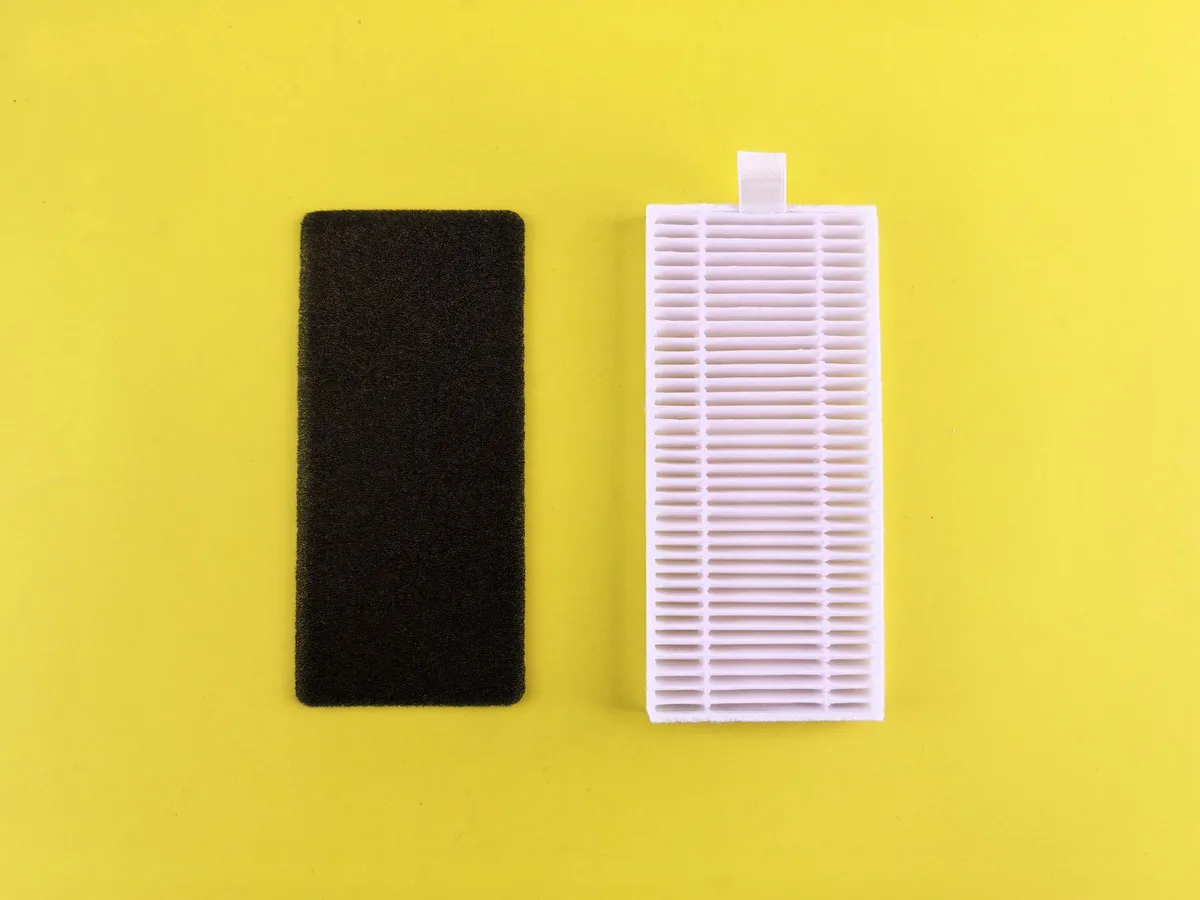
Image source: Pexels / Andrey Matveev (Pexels License)
How Fast Should It Get Dirty?
That depends on your environment. Here’s a rough guide:
| Environment | Filter appearance after 3 months |
|---|---|
| Clean home, no pets | Light gray tint |
| Average home, one pet | Noticeable dust layer |
| High pollution area, smokers, multiple pets | Dark discoloration |
| Near a construction zone | Heavy soiling |
If your filter still looks brand new after six months of daily use, something is wrong. Either the air is already pristine, or the unit isn’t pulling air through the filter properly.
Important: If you notice no discoloration after heavy use, check for an air bypass. Sometimes purifiers develop gaps around the filter frame. Air slips past instead of going through the media.
That means zero filtration.
Measure Airflow
A dead or dying purifier often has weak airflow. Place your hand near the outlet grille. You should feel a steady stream of air.
For a more precise test, use an anemometer. These cheap handheld devices measure air speed. Point it at the outlet.
Compare the reading to the manufacturer’s spec.
Most units will lose some airflow over time as the filter loads up. But a dramatic drop indicates a problem. The fan might be failing.
Or the filter is clogged and needs replacing.
The Tissue Test
No anemometer? No problem. Tear off a strip of toilet paper.
Hold it in front of the outlet. A working purifier should blow that tissue horizontally. If it barely flutters, you’ve got weak airflow.
This test works especially well for smaller desktop units. Bigger floor models should move enough air to ruffle your hair when you stand nearby.
Watch the Particle Counter
This is the most objective method. I use it in every review. And you can do it too.
Buy a standalone particle counter. They’re affordable now, around $50 to $100 for a decent one. These devices measure PM2.5, PM1.0, and PM10 levels with good accuracy.
Here’s the protocol:
- Place the particle counter in the same room as your purifier
- Take a baseline reading
- Run the purifier on high for 15 minutes
- Check the new reading
A working purifier should reduce particle counts by at least 50% in that timeframe. In a small, sealed room, you might see 80% or more.
I’ve tested units that dropped PM2.5 from 45 µg/m³ down to 3 µg/m³ in under 30 minutes. That’s a 93% reduction. That’s a working purifier.
Listen to the Machine
This sounds simple, but it matters. A purifier makes certain sounds when it’s functioning normally.
Fan noise: Consistent whirring. It might change pitch when you adjust speed, but it shouldn’t stutter or grind.
Clicking: That’s often the timer or auto-mode switching. Normal.
Rattling: Not normal. Something might be loose inside. Or the filter isn’t seated properly.
Silence: If the fan stops but the unit appears to be on, check the settings. Some purifiers have a “sleep mode” that turns the fan off at night. Others cycle on and off based on air quality readings.
If the unit is completely silent for hours on end and you didn’t set it to sleep mode, something’s off.
Check the Filter Timer or Replacement Indicator
Most modern purifiers track how long the filter has been used. They’ll light up a red or yellow indicator when it’s time for a change.
Here’s the thing: that indicator is based on runtime, not actual performance. It’s a rough guide. But if you’ve been running the unit for months and haven’t seen the indicator yet, it might mean the unit isn’t operating as much as you think.
Some units have an “auto” mode that runs the fan at very low speeds when the air seems clean. In those cases, the filter timer clicks over much slower. That’s normal.
But if you’ve been running the unit on high for 500 hours and the filter indicator hasn’t triggered, double-check the manual. Some units require manual reset after a filter change. If someone replaced the filter but didn’t reset the timer, the indicator might never appear.
Do the “Sealed Room” Challenge
Want to really test your purifier? Here’s a little experiment I run in my lab:
- Pick a small room. Close all doors and windows. Seal gaps under the door with a towel.
- Generate visible particles. Burn a match. Let it smoke for a few seconds. Or use an essential oil diffuser with water vapor.
- Turn the purifier to high speed.
- Leave the room. Come back in 20 minutes.
In a small, sealed space, a properly working purifier should clear visible smoke or haze within 20 to 30 minutes. If you still see haze, the unit isn’t moving enough air.
Pro tip: Do this test at night with a flashlight. Shine the beam across the room. You’ll see particles floating in the light.
After running the purifier, that beam should look nearly empty.
Monitor Humidity and Temperature
This is subtle, but useful. A working purifier doesn’t directly change temperature or humidity. But it does affect how these feel.
Poor air quality often correlates with stuffiness. After running a purifier, many people report the room feels “fresher”, even if the temperature hasn’t changed. That’s because the unit is removing particles that make the air feel heavy.
If you have a hygrometer, you might notice that humidity stabilizes with a purifier running. That’s because the filter can trap moisture-borne allergens and mold spores. It’s not a dehumidifier, but it helps maintain a cleaner environment.
Common Problems That Make Purifiers Seem Broken
Before you assume your unit is useless, rule these out:
Wrong Fan Speed
Some people set their purifier to “low” and expect miracles. Low speed is for maintaining clean air, not cleaning dirty air. If you’re trying to clear smoke or dust, run it on high for at least 30 minutes.
Incorrect Placement
A purifier needs airflow around it. If you shove it in a corner, behind furniture, or against a wall, it can’t pull in enough air. Keep at least 12 inches of clearance on all sides.
Undersized Unit
That tiny desktop purifier isn’t designed to clean a 500-square-foot living room. It’s made for a desk or a small bedroom. Check the CADR rating.
If it’s too low for your room size, the unit will never catch up.
Dirty Pre-Filter
Many units have a washable pre-filter that captures large particles. If this gets clogged, the main filter gets starved of airflow, and the whole system suffers. Clean the pre-filter every few weeks.
Wrong Filter Type
Some purifiers come with a generic replacement option that doesn’t fit properly. Air leaks around the edges. The unit looks like it’s working, but it’s filtering almost nothing.
Always use the correct filter for your model.
Satellite View: How Often Should You Verify Performance?
You don’t need to test your purifier every day. But I recommend a quick check once a month:
- Visual: Look at the filter for discoloration
- Tactile: Feel the airflow at the outlet
- Auditory: Listen for unusual sounds
- Sensor check: If you have a monitor, watch it during cooking or dusting
Every three months, do a deeper inspection. Pull the filter out. Examine it under good light.
Compare to a photo you took when it was new.
Every six months, run the sealed room test. That will tell you if the unit is still performing at its peak.
When to Call It Quits
No purifier lasts forever. After three to five years of continuous use, even the best units start to degrade.
Signs it’s time to replace the whole machine:
- Fan noise becomes noticeably louder or rougher
- Airflow drops even with a fresh filter
- The unit trips the circuit breaker
- The power supply gets hot to the touch
- The sensor stops responding
Don’t throw good money at a dying unit. If the motor is failing, replacing filters won’t fix it.
Final Verdict
You don’t need expensive lab equipment to tell if an air purifier is working. Your senses, a simple particle counter, and a little patience are enough.
Watch the monitor if you have one. Feel the airflow. Look at the filter.
Notice how the room smells and feels after a few hours.
A working air purifier is quiet, consistent, and leaves visible evidence of its work. A non-working one wastes your electricity and your money.
If your unit passes all these checks, breathe easy. It’s doing exactly what it should.

Table of Contents