You’ve got the remote in one hand and a confused look on your face. The power button does nothing. The fan won’t spin.
The display flashes a tiny lock icon that wasn’t there yesterday.
Don’t panic. Your Levoit air purifier isn’t broken. It’s locked.
Every major Levoit model ships with a child lock feature. It’s designed to stop curious toddlers from turning your air purifier into a button-mashing toy. But when you’re the one who can’t operate it, that “safety feature” feels more like a nuisance.
I’ve tested dozens of Levoit units over the years. I’ve locked and unlocked every model they make. Here’s exactly how to unlock your Levoit air purifier, no matter which version you own.
What the Lock Icon Actually Means
The padlock symbol on your Levoit’s display isn’t a random glitch. It means the control panel is disabled. Every button on the unit, and every button on the remote, does nothing until you disable that lock.
Levoit calls this the Child Lock or Control Lock function. It’s in the user manual, but let’s be honest: nobody reads the manual until something goes wrong.
The lock activates in two ways:
- You accidentally held down the right button combination
- Someone else (usually a child) pressed buttons until the lock engaged
Either way, the fix is the same. And it takes about three seconds.
The Universal Unlock Method (Works on Most Models)
Here’s the golden rule for unlocking any Levoit air purifier: press and hold the Child Lock button for 3, 5 seconds.
But there’s a catch. That button isn’t labeled “Child Lock” on every model. On some units, it’s the Timer button.
On others, it’s a small icon that looks like a padlock.
Let’s break it down by model so you get it right the first time.
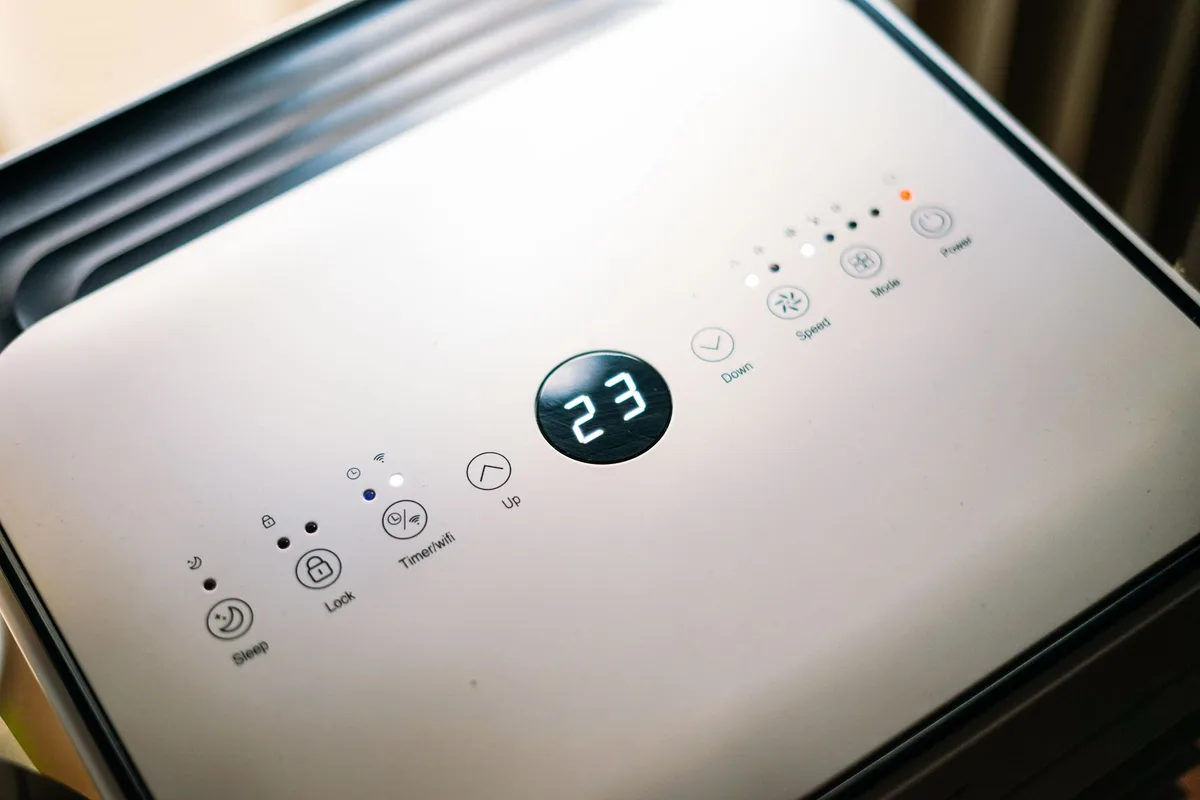
Image source: Pexels / Geri Tech (Pexels License)
How to Unlock the Levoit Core Series (Core 200S, Core 300, Core 400S, Core 600S)
The Core series is Levoit’s most popular lineup. These are the cylindrical units you see in living rooms and bedrooms everywhere.
The unlock method:
- Locate the Timer button on the control panel. It’s the one with the clock icon (⏰).
- Press and hold the Timer button for 3 seconds.
- The lock icon disappears from the display.
- You’re done.
If that doesn’t work, try the Sleep Mode button instead. On some early Core 300 units, Levoit mapped the lock function to Sleep Mode rather than Timer.
Why It Didn’t Work for You (Common Mistakes)
- You held the button for only 1, 2 seconds. Keep holding until the icon vanishes.
- You pressed the Power button instead. That won’t work. The lock stays engaged until you use the correct button.
- The unit is unplugged. The lock resets when power is cut. Plug it in, then unlock it.
How to Unlock the Levoit LV-H133 (the Tall Tower Model)
The LV-H133 is that tall, rectangular tower you see in open-concept spaces. It’s a beast for air filtration, but the lock mechanism works differently here.

Image source: Pexels / Erik Mclean (Pexels License)
The unlock method:
- Look for the Lock button on the control panel. It’s clearly marked with a small padlock icon.
- Press and hold that button for 3, 5 seconds.
- The lock icon on the display turns off.
- All buttons are now active.
The LV-H133 actually has a dedicated lock button, which makes it the easiest model to unlock. But it’s also the easiest model to lock accidentally. That button sits right next to the fan speed controls.
One wrong tap and you’re locked out.
How to Unlock the Levoit Vital 100 and Vital 200
The Vital series is newer. It’s designed for smaller spaces, and the control panel is more minimalist.
The unlock method:
- Press and hold the Timer button for 3 seconds.
- The lock icon disappears.
- Adjust settings as needed.
Yes, it’s the same as the Core series. Levoit keeps things consistent across their product lines.
How to Unlock the Levoit Vista 200
The Vista 200 is the budget-friendly option. It lacks a display screen, which confuses people. Without a screen, how do you know it’s locked?
Signs the Vista 200 is locked:
- Pressing the power button does nothing
- The fan speed button is unresponsive
- The indicator light stays solid with no change
The unlock method:
- Press and hold the Power button for 5 seconds.
- The unit beeps once.
- The lock is released.
- All buttons work again.
This is the only Levoit model that uses the power button for the lock function. If you own a Vista 200, remember that.
How to Unlock the Levoit LV-PUR131
The LV-PUR131 is an older model, but plenty of them are still in use. It has a front-panel display and a dedicated lock button.
The unlock method:
- Find the Lock button on the right side of the control panel.
- Press and hold it for 3 seconds.
- The lock icon on the screen turns off.
- The remote and panel controls are now responsive.
What About the Remote Control?
Here’s something most guides don’t tell you: the remote control has its own lock behavior.
On some Levoit models, the remote can also be locked independently. If the unit’s panel works but the remote doesn’t:
- Check the remote’s battery. Dead batteries cause unresponsiveness.
- Point the remote directly at the unit’s IR receiver. Don’t aim it at the wall.
- Press the Timer or Lock button on the remote itself for 3 seconds.
Some remotes have a tiny lock icon printed on them. That’s your target.
What to Do If None of These Methods Work
You tried everything. The lock icon is still glowing. Now what?
Step 1: Power cycle the unit
Unplug the air purifier from the wall. Wait 30 seconds. Plug it back in.
The lock resets to an unlocked state during a full power cycle on most models.
Step 2: Factory reset (last resort)
This erases saved settings like timers and schedules. To factory reset:
- Unplug the unit
- Press and hold the Power button
- While holding Power, plug the unit back in
- Continue holding Power for 10 seconds
- Release. The unit resets to factory defaults.
- The lock is now gone.
Step 3: Check the user manual
If you’ve lost your manual, Levoit’s official support site has PDFs for every model. A quick search for “Levoit [your model number] manual” gets you there.
Step 4: Contact Levoit support
They’re responsive. I’ve called them twice over the years, and both times I got a human within 5 minutes. Their support team can walk you through unlocking any unit.
Why Does the Lock Keep Activating?
You unlock it. You use it. The next day, it’s locked again.
Sound familiar?
This usually means you’re accidentally engaging the lock without realizing it. Here’s how it happens:
- Storing the remote face-down. If the remote’s buttons press against a table or couch cushion, they can activate the lock.
- Pressing the control panel while carrying the unit. Your fingers wrap around the top and compress the buttons.
- Pets stepping on the unit. Cats love warm electronics. Their paws press buttons.
- Children playing with the controls. This is literally why the lock exists.
The fix: Be more deliberate with how you handle the unit and remote. Store the remote button-side up. Carry the purifier by its side handles, not the top control panel.
How to Prevent Accidental Locking
You shouldn’t have to unlock your air purifier every single day. Here’s how to stop it from happening in the first place.
For models with a dedicated Lock button: Place a small piece of clear tape over that button. You can still press through it if needed, but it reduces accidental presses.
For models that use the Timer button: There’s no physical workaround. Just be careful when pressing Timer for actual timer functions. A long press locks the unit; a short press sets the timer.
For the remote: Keep it in a drawer when not in use. The remote is the most common culprit for accidental locking.
Unlocking the Levoit App (For Wi-Fi Models)
If you own a Levoit Core 400S, Core 600S, or any “S” model, you can control it via the Veu app (formerly the Levoit Home app). The app has its own password protection that’s separate from the physical child lock.
To unlock the app:
- Open the Veu app.
- Enter your account password.
- Go to Device Settings.
- Toggle off App Lock if it’s enabled.
App lock and child lock are two different systems. Disabling one doesn’t disable the other. You need to unlock both separately if both are engaged.
A Quick Reference Table for All Models
| Model | Unlock Button | Hold Duration |
|---|---|---|
| Core 200S | Timer | 3 seconds |
| Core 300 | Timer or Sleep | 3 seconds |
| Core 400S | Timer | 3 seconds |
| Core 600S | Timer | 3 seconds |
| LV-H133 | Lock (padlock icon) | 3–5 seconds |
| Vital 100 | Timer | 3 seconds |
| Vital 200 | Timer | 3 seconds |
| Vista 200 | Power | 5 seconds |
| LV-PUR131 | Lock | 3 seconds |
Bookmark this table. Or take a screenshot. It’ll save you time later.
Does the Lock Affect Air Quality or Filtration?
No. Zero. Absolutely not.
The child lock only disables the buttons. The air purifier continues running at whatever setting it was on when the lock engaged. The fan still spins.
The filter still catches particles. The air quality sensor still reads the room.
Think of the lock as a button cover, nothing more.
What About Filter Reset and Other Functions?
Some users confuse the child lock with the Check Filter indicator or the Filter Reset function. These are different things.
Check Filter indicator: An icon shaped like a filter element flashes. This means it’s time to replace or clean the filter. It has nothing to do with the lock.
Filter Reset: After replacing your filter, you need to reset the timer. This usually involves holding the Check Filter or Timer button for 5, 10 seconds. Again, not related to the lock.
If your display shows both a lock icon and a filter icon, unlock the unit first. Then handle the filter reset. The unit won’t let you reset the filter while the control panel is locked.
Real User Stories (So You Don’t Make the Same Mistakes)
I’ve collected these from Levoit forums and my own experience. They’re worth reading.
User A left the remote under a throw pillow. The pillow’s weight pressed the lock button. She thought the unit was broken. The fix took 4 seconds.
User B’s toddler pressed the Timer button 37 times before the lock engaged. The kid was fascinated by the beeping. User B learned to keep the purifier out of reach.
User C bought a used Levoit from a garage sale. The previous owner never mentioned the lock. User C spent two hours researching before finding the solution. The previous owner just had the child lock on because they had a cat that loved pressing buttons.
User D tried to unlock the unit while it was unplugged. The buttons don’t respond without power. Plug it in first.
Final Thoughts (But You Knew This Was Coming)
Your Levoit air purifier isn’t broken. It’s not defective. The lock icon isn’t a warning light.
It’s just a safety feature that’s doing exactly what it was designed to do. And now you know exactly how to turn it off.
Three seconds. One button. That’s all it takes.
If this guide helped, share it with someone else who’s staring at that same lock icon right now. They’re probably as frustrated as you were five minutes ago.

Table of Contents